
How to Search Cases by Name
Go straight to the official Wisconsin Circuit Court Access portal for a name search. Accept the public agreement first. Then pick St. Croix County and enter the most reliable name information you have. A query that is too broad tends to pull in spelling variants, so lean on the county, date, and case-type filters to separate people who share a name. Before you trust a result, check the caption, the filing date, the case class, and the case number against what you already know. That comparison tells you whether you have the right St. Croix County case.
- Open WCCA and accept the public access agreement.
- Select St. Croix County, then enter the last name and known first-name details.
- Add a business name, date range, or case-type filter only when useful.
- Review possible matches and open the case number for the summary and event history.
- Verify an important fact with the St. Croix County Clerk of Circuit Court.
| Field | Type | Required | Use |
|---|---|---|---|
| County | Dropdown | For local results | Select St. Croix. |
| Party name | Text | Search dependent | Use the spelling on a notice. |
| Business name | Text | No | For an organization named as a party. |
| Case number | Text | No | Best unique lookup key. |
| Case type or date | Filter | No | Narrows a long list. |
St. Croix County Filtering in WCCA
WCCA covers the whole state. Its county filter is what turns it into a St. Croix County case lookup. The portal mirrors public information from the county case-management system. It is not a separate database. St. Croix County offers no second public portal with every filing image. Filtered results can span civil, criminal, family, probate, small-claims, and traffic matters filed in circuit court.
The filter also guards against a common mistake. It keeps you from opening a same-name case that belongs to another Wisconsin county. Some cases do not belong to circuit court at all. A city-issued ordinance, parking, or traffic citation may sit with Hudson, New Richmond, River Falls, or Glenwood City Municipal Court. It can stay out of WCCA entirely. That is true unless the matter is transferred, appealed, or otherwise filed in circuit court.
How to Search by Case Number
A full circuit case number is the fastest key, because it points to one file. Wisconsin numbers commonly look like 2026-CF-000123. The first segment is the filing year. The letters mark the case classification. The final segment is the sequence for that year. Enter every part exactly as printed on the notice.
Class codes explain why two similar St. Croix County results can look very different. CF marks a felony file, CM a misdemeanor file, and CT a criminal traffic file. Civil, family, probate, and small-claims files carry other codes. This number is neither a municipal citation number nor an appellate identifier. Appeals live in Wisconsin Supreme Court and Court of Appeals Case Access, known as WSCCA.
When Names Point to the Wrong Case
Treat a name match as a lead, never as proof of identity. WCCA itself warns that public information can be incomplete. Safer confirmation comes from middle initials, captions, filing dates, case classes, and counties. Do not attach a St. Croix County case to someone just because the names look familiar. Match the first and last name alone? That is not enough.
Same name, different person: compare several fields, then ask the originating Clerk to resolve a likely false match or county-entered error.
WCCA staff cannot change what a county court has entered. For St. Croix County data, that means the Clerk of Circuit Court. The clerk's office can tell you whether a correction takes a motion, another filing, or supporting proof.
What a Case Search Shows
Think of the public case summary as an index to the proceeding. It can show which court holds the file and trace the order of docket events. It is not the complete court file, and it is not a certified copy. An event title may name a complaint, motion, order, hearing, judgment, or disposition. No image may appear with it.
| Case number | The filing year, class code, and sequence, such as 2026-CV-000321. |
|---|---|
| Caption and parties | The formal title and public party information. |
| Case type | The classification used to route the matter. |
| Filed date and status | When the file opened and whether it is pending or disposed. |
| Court activity | Public filings, orders, settings, and results in date order. |
| Financial summary | Public obligations where available. |
When you need a pleading, judgment, transcript, or certified document, follow the St. Croix County court record request. A printout from your browser is not Clerk-certified.
WCCA Updates in St. Croix County
Under the WCCA agreement, county case data updates hourly while the system runs. Overnight maintenance falls around 3:00 to 4:00 a.m. Central. A fresh St. Croix County filing can be missing. Staff may still be processing it, and the next update may not have run yet.
Registered eFiling is a separate view. Attorneys and authorized parties may see documents in their own cases. A submitted document can still await processing. A black document name can signal restricted access. Neither detail means a public case has vanished. The official Wisconsin eFiling support guide walks through these screens.
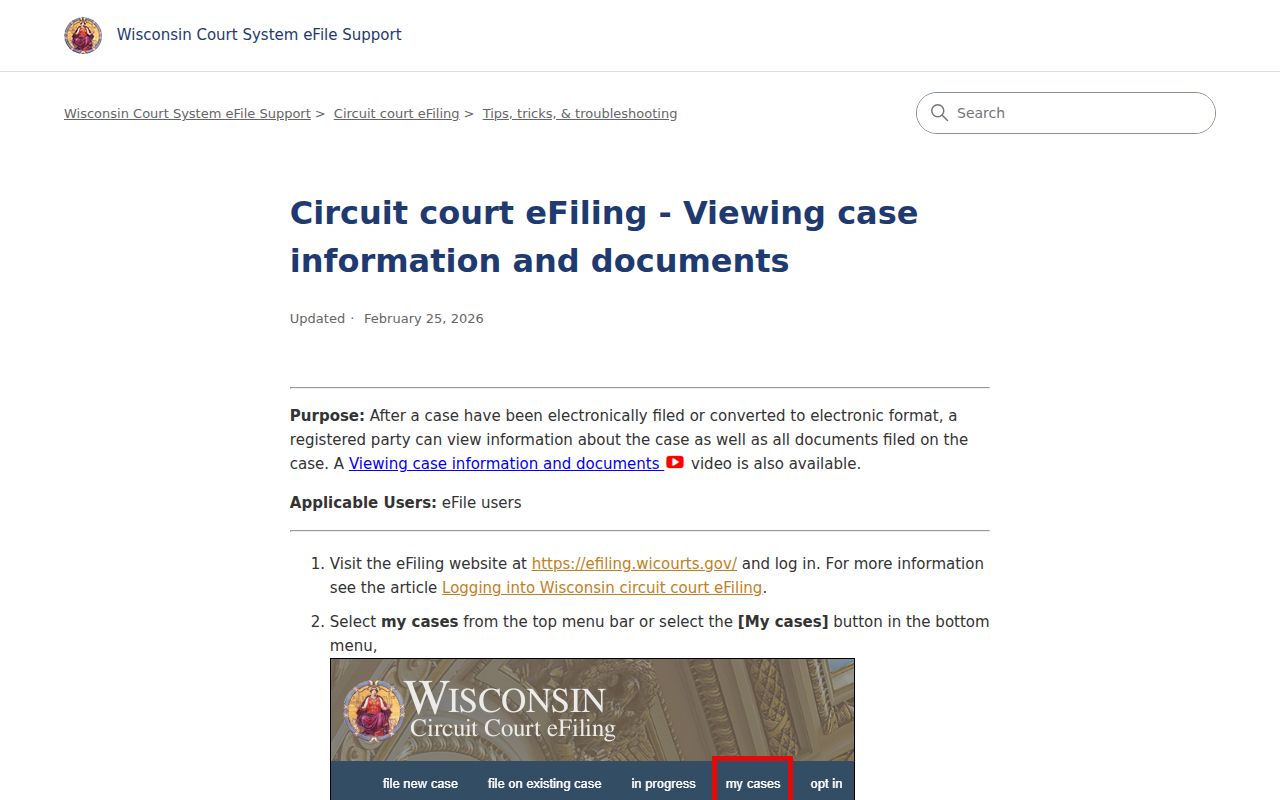
It shows why the authorized eFiler view and the public WCCA case summary are two different things.
County vs Statewide Case Search
WCCA doubles as both Wisconsin's statewide circuit search and the local route once you filter it to St. Croix County. The Clerk of Circuit Court supplies the official file, older material, certified copies, and answers about county-entered data. WSCCA holds appellate dockets. Municipal courts keep many local citations.
| Channel | Coverage | Best use |
|---|---|---|
| WCCA | Public Wisconsin circuit cases | St. Croix name and number searches |
| Clerk | Official county file | Copies, older files, and corrections |
| WSCCA | Wisconsin appellate courts | Appeal dockets |
| Municipal court | Local citations | Issuing-city matters |
The St. Croix County Clerk Fallback
Online search comes up empty sometimes. When it does, the St. Croix County Clerk of Courts still has you covered several ways: courthouse computers, a walk-up counter, phone help, and mail. The main line is 715-386-4630. Need a specific division? Civil answers at 715-386-4633, criminal at 715-386-4631, family at 715-386-4626, small claims at 715-386-4636, and traffic or ordinance at 715-386-4635 or 715-386-4638.
Missing the case number is fine. Per the county FAQ, give staff both party names and the year, and a staff docket search runs $5 by name and case type. Tell them the division and the record you want. Walk-in service happens at 1101 Carmichael Road, Hudson, WI 54016. Check current hours on the Clerk's official page before you go.
Mail works too. Include your contact and return information, every party name you know, the filing year, and the likely division, and say whether you just need the case number or want a specific public document. Divorce and paternity judgments go to the Family Division, and the county suggests allowing about two weeks. Treat that as guidance for those records, not a promise for every search.
Restricted Cases and Access Rules
A blank search result proves nothing. Confidential records stay out of WCCA, including adoptions, juvenile delinquency, child protection, termination matters, guardianships, and civil commitments. So a St. Croix County case can exist even when the docket search returns nothing at all.
Partial results happen too. A sealed case may display only limited information. A fully public case can still hold individual protected documents. Dismissal alone never seals a file, and a record kept under SCR Chapter 72 can remain confidential anyway. Want restricted material? Contact the Clerk and follow whatever procedure the assigned court requires, which might mean a motion or cited legal authority. An online absence never proves expunction.
Finding Older St. Croix County Cases
Older court records need patience. The WCCA agreement warns that converted legacy files often carry less detail than newer electronic ones, so ask the Clerk whether a file predates CCAP conversion, sits in paper or microfilm, or has already passed a retention deadline. A precise request helps. Give the parties, the approximate filing year, the division, and the document you want. That narrows staff searching and keeps similarly named older cases from blurring together.
No internet? A public terminal at the St. Croix County courthouse offers docket access. The same legal limits apply. For historical digging, the Clerk remains the practical go-to office.
Keep circuit and appellate history straight. A St. Croix County circuit case number stays in WCCA, but any later appeal gets its own WSCCA entry. Match them with the circuit caption and number. Then read the appellate docket itself instead of expecting every appeal event in the county summary. Federal litigation is separate again, run through PACER at the U.S. District Court for the Western District of Wisconsin. Each system answers a different jurisdictional question.